

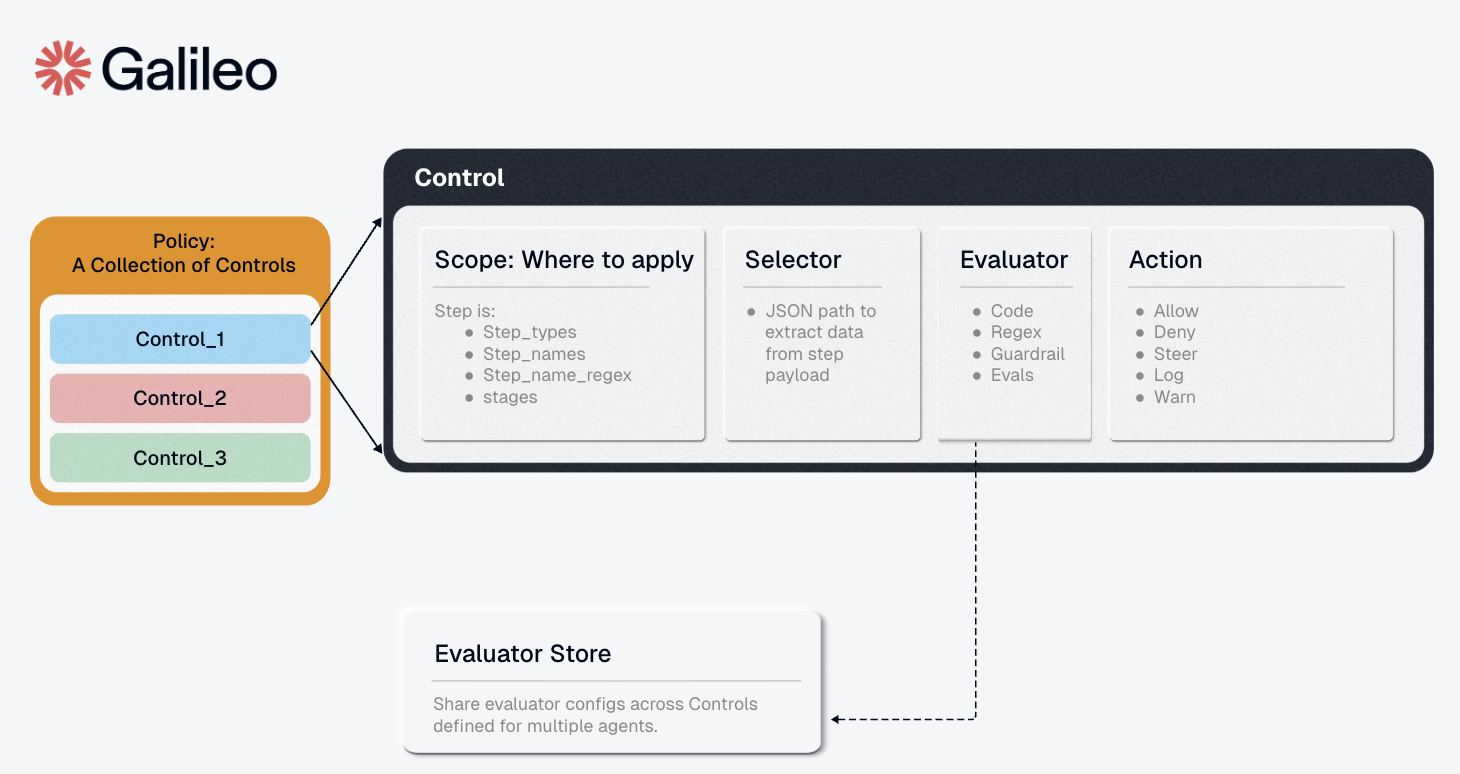
1. Scope (When to Check)
The Scope defines which steps trigger the control—acting as a filter to select specific sections of your agent workflow to monitor. Fields:-
step_types: List of step types (['tool', 'llm']). If null, applies to all types. -
step_names: List of exact step names to target (e.g.,['search_db', 'send_email']) -
step_name_regex: Regex pattern for step name matching (e.g.,"^db.*"matches all “db_” prefixed steps) -
stages: When to evaluate -['pre', 'post']-
'pre': Check before execution (block bad inputs, prevent prompt injection) -
'post': Check after execution (filter bad outputs, redact PII)
-
Example 1: Apply to all tool steps before execution
Example 2: Target specific database operations
Example 3: Use regex to match multiple steps
Example 4: Full scope configuration
2. Selector (What to Check)
The Selector specifies which portion of the step’s data to extract and pass to the evaluator for analysis. It uses a path specification to navigate the step object. Field:path: Dot-notation path to the data you want to evaluate
-
"input"- Entire input to the step -
"output"- Step’s output/result -
"input.query"- Specific parameter within input -
"input.user_message"- User message field -
"name"- The step/tool name itself -
"context.user_id"- Context metadata -
"*"- All available payload data
Example 1: Check tool output for PII
Example 2: Validate specific input parameter
Example 3: Check user message in LLM input
Example 4: Access context metadata
3. Evaluator (How to Check)
The Evaluator receives the data extracted by the selector and evaluates it against configured rules, returning whether the data matches specified criteria. Components:-
config: Evaluator-specific configuration, validated against the evaluator’s schema -
metadata: Optional evaluator identification
Example 1: Regex evaluator to detect PII
Example 2: List evaluator for banned terms
Example 3: AI-powered toxicity detection with Luna-2
To use this evaluator, install the package:Example 4: Complex regex for multiple PII types
4. Action (What to Do)
The Action defines what happens when the evaluator matches/detects an issue. Fields:-
decision: The enforcement action to take-
"allow"- Continue execution (useful for allowlist controls) -
"deny"- Hard stop execution (blocks the request) -
"steer"- Provides corrective guidance to help agents satisfy control requirement -
"warn"- Log a warning but continue execution -
"log"- Log the match for observability only
-
-
metadata: Optional additional context (JSON object)
Important: “Deny Wins” Semantics
Agent Control uses “deny wins” logic: if any enabled control with adeny action matches, the request is blocked regardless of other control results. This ensures fail-safe behavior.
Example 1: Block on match
Example 2: Warn without blocking
Example 3: Action with metadata
Example 4: Action with steer and steering context
Complete Control Example
Putting it all together - a control that blocks Social Security Numbers in tool outputs:Defining Controls
You can create and configure controls via the SDK, API, or UI.Example: Block PII in Output (Regex)
Via Python SDK:Example: Block Toxic Input (Luna-2 AI)
To use this evaluator, install the package and restart the server.
Note: For the Luna-2 evaluator, set the GALILEO_API_KEY environment variable. See the Evaluators for all available evaluators.