

Prerequisites
- Python 3.12+
- Docker
Step 1: Start the Server and Install the SDK
Run the one-liner to start the Agent Control server and dashboard, then install the SDK:- Server + UI running at
http://localhost:8000✅ - Python SDK installed ✅
💡 Verify the server: Open http://localhost:8000/health — you should see {"status": "healthy", "version": "..."}.
Alternative: Local development with the repo
Alternative: Local development with the repo
If you want to contribute to Agent Control or run from source, clone the repository instead:Additional prerequisites:
- uv — Fast Python package manager (
curl -LsSf https://astral.sh/uv/install.sh | sh) - Node.js 18+ — For the web dashboard (optional)
- Server runs at
http://localhost:8000✅ - UI runs at
http://localhost:4000✅
Step 2: Create a Control
You can create controls through the UI dashboard or programmatically with the SDK. Here we’ll use the SDK to create a control that blocks SSN patterns in agent output:Step 3: Protect Your Agent
Add the@control() decorator to any function you want to protect. Agent Control will intercept the output and check it against your controls.
What Is Happening Under the Hood
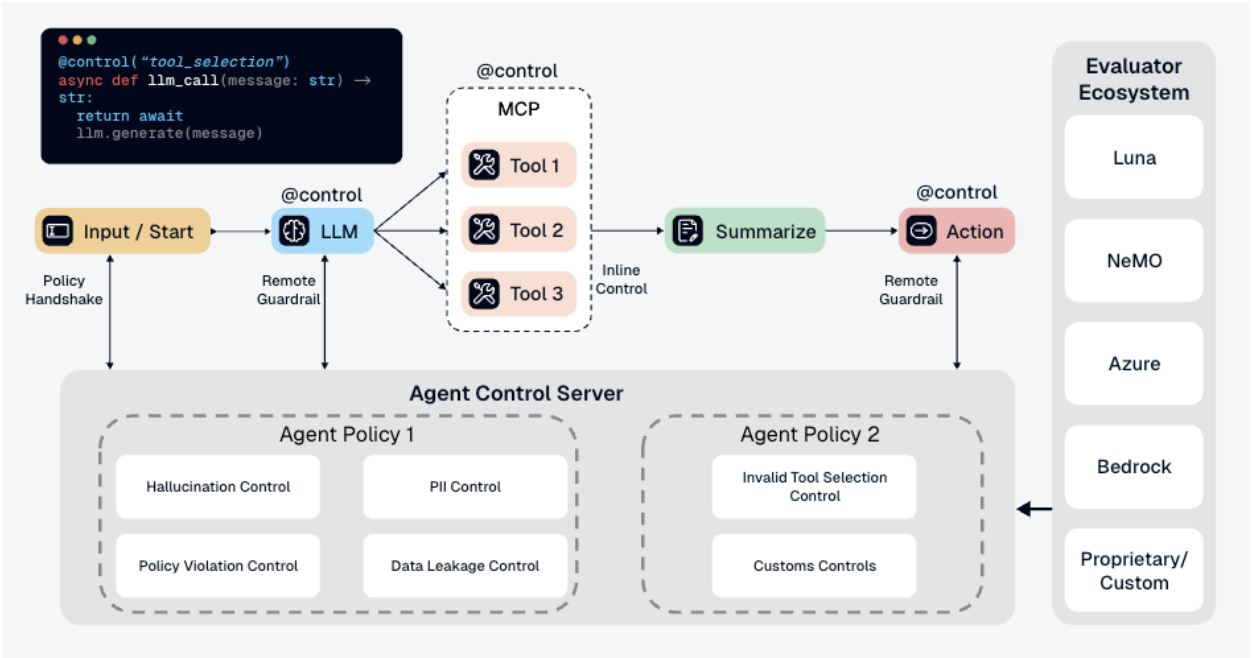
- Your app calls
chat("test") - The function returns
"Your SSN is 123-45-6789" - The
@control()decorator sends the output to the Agent Control server - The server checks the output against all controls associated with this agent
block-ssnfinds an SSN pattern → match- The server returns
is_safe=False - The SDK raises
ControlViolationErrorand blocks the response
- ✅ Controls are managed separately from your code
- ✅ Update controls without redeploying your agent
- ✅ Same controls can protect multiple agents
- ✅ View analytics and control execution in the dashboard
What’s Next
UI Quickstart
Manage agents and controls visually through the dashboard.
Concepts
Learn about controls, selectors, evaluators, and actions.
Examples
See working integration examples with LangChain, CrewAI, and more.
Configuration
Server configuration, authentication, and deployment options.